
Microsoft Surface Pro Review: 12-inch vs 13-inch – Which One Should You Buy?
Technology keeps moving fast, and laptops today are not just laptops anymore. They can turn into tablets, they can run apps like a phone, and they can help you draw, write, o
r even design things like an artist. One of the best devices that shows this is the Microsoft Surface Pro.
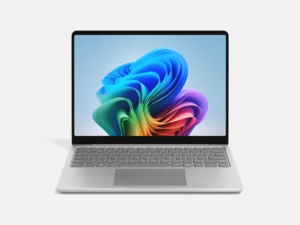
The Surface Pro is a “2-in-1” computer. That means it can be used as a laptop (with a keyboard) and as a tablet (without the keyboard). People love it because it’s light, powerful, and easy to carry anywhere.
But here’s the big question: should you get the 12-inch Surface Pro or the 13-inch Surface Pro?
Let’s take a closer look at both, compare them, and find out which one is the best for you.
(Image Credit: Microsoft)
Meet the Microsoft Surface Pro (12-inch)
The 12-inch Surface Pro is like a smart notebook. It has a touchscreen, works with the Surface Pen (a digital pen for drawing or writing), and is small enough to fit in a backpack.
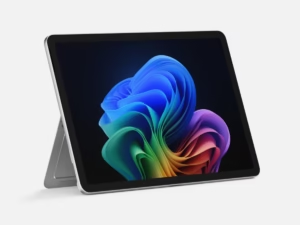
Best Features of the 12-inch Surface Pro:
-
Compact Size: At 12 inches, it’s easy to carry around. It feels like holding a thin notebook.
-
Touchscreen Display: Bright and sharp screen, perfect for watching videos, Zoom calls, or reading.
-
Lightweight: Around 1.7 pounds without the keyboard, which is lighter than most laptops.
(Image Credit: Microsoft)
-
Battery Life: Lasts around 12-13 hours, so you can use it all day at school or work.
-
Performance: Runs on Intel processors (like i5 or i7), so it can handle school projects, Office apps, and even some light gaming.
-
Windows 11: Comes with the newest version of Windows, which is smooth and easy to use.
The 12-inch version is best for students, travelers, or anyone who needs something portable.
Meet the Microsoft Surface Pro (13-inch)
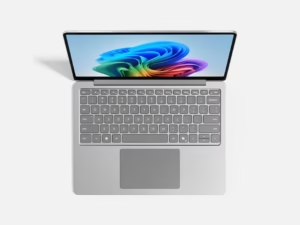
The 13-inch Surface Pro is a bit bigger. You might think 1 inch doesn’t matter much, but it really does. That extra space makes the screen look larger, typing easier, andmultitasking more fun.
(Image Credit: Microsoft)
Best Features of the 13-inch Surface Pro:
-
Bigger Screen: At 13 inches, you get more room for apps, games, or split-screen work.
-
Sharper Display: The screen has higher resolution, which makes videos and pictures look amazing.
-
Better for Multitasking: If you like opening many apps at once, the bigger screen makes it easier.
-
Performance: Similar to the 12-inch, but the cooling and battery are slightly better in newer models.
-
Battery Life: Lasts about 13-15 hours, depending on what you do.
-
Stylus-Friendly: Artists and designers love the bigger canvas for sketching or digital art.
The 13-inch version is perfect for professionals, artists, or anyone who wants a laptop-tablet combo that feels closer to a real laptop.
Side-by-Side Comparison: 12-inch vs 13-inch
Here’s a simple chart to help you see the differences:
Feature |
Surface Pro 12-inch |
Surface Pro 13-inch |
Screen Size |
12.3 inches |
13 inches |
Weight |
1.7 lbs |
1.9 lbs |
Battery Life |
12–13 hours |
13–15 hours |
Resolution |
2736 x 1824 |
2880 x 1920 |
Performance |
Intel i5/i7 chips |
Intel i5/i7 chips |
Portability |
Easier to carry |
Slightly bigger but still slim |
Best For |
Students, travelers |
Professionals, artists |
Pricing: How Much Do They Cost?
Microsoft changes prices depending on the model, memory, and storage. But here’s a rough guide:
-
Surface Pro 12-inch: Starts around $999 and can go up to $1,500+ depending on upgrades (like faster processors or more storage).
-
Surface Pro 13-inch: Starts around $1,099 and can go up to $1,700+ for higher-end models.
Remember: the keyboard and pen usually cost extra. The keyboard is about $150, and the pen is around $100.
What Makes the Surface Pro Special?
-
2-in-1 Magic: Switch from laptop to tablet in seconds.
-
Touchscreen Fun: Draw, tap, swipe, and write naturally.
-
Super Portable: Lighter than most laptops, so easy to bring to school or the office.
-
Great for Students and Professionals: Perfect for note-taking, video calls, and working on projects.
-
Strong Battery Life: Use it all day without needing to plug in.
-
Windows 11: Full laptop power in a tablet body. You can install real apps, not just mobile ones.
Why Should You Buy It?
Here’s why people love Surface Pro:
-
Students: Great for taking notes, drawing diagrams, attending online classes, and watching lessons.
-
Artists: The Surface Pen and big screen (especially the 13-inch) make it amazing for digital drawing or painting.
-
Business Professionals: Super light for traveling, strong enough for presentations, and perfect for typing emails on the go.
-
Everyday Users: Watch Netflix, play light games, browse the web, and connect with friends.
If you’re choosing between the two:
-
Get the 12-inch if you want something small, light, and easier to carry every day.
-
Get the 13-inch if you like a bigger screen for work, art, or entertainment.
Which One Wins?
Honestly, both are great. The 12-inch wins for portability. The 13-inch wins for experience and comfort.
Think of it this way:
-
The 12-inch is like carrying a small notebook.
-
The 13-inch is like carrying a magazine — still light, but more space to enjoy.
Final Thoughts
The Microsoft Surface Pro is not just a gadget — it’s like having a laptop, a tablet, and a sketchbook in one. Whether you go for the 12-inch or the 13-inch, you’re getting a powerful device that can help with school, work, or fun.
-
Choose the 12-inch if you’re always on the move.
-
Choose the 13-inch if you want more space to create, work, or watch movies.
Either way, you’ll love how light, fast, and useful it is.
If you’re looking for a computer that’s easy to carry, fun to use, and strong enough for work or play, the Microsoft Surface Pro is worth buying.
Conclusion
The Microsoft Surface Pro is like having a laptop, tablet, and digital notebook all in one. Whether you pick the 12-inch or the 13-inch, you’ll get a device that’s stylish, powerful, and perfect for school, work, or play.
If you want portability, choose the 12-inch.
If you want more comfort and space, choose the 13-inch.
No matter what, the Surface Pro is a smart buy in 2025.
👋 Final Words
The Microsoft Surface Pro 12-inch and 13-inch both bring power, style, and flexibility into one device. Whether you’re a student, professional, or artist, there’s a Surface Pro that fits your lifestyle.
But wait—our journey doesn’t end here! 🎉
👉 Stay tuned for our next big review: iPad Pro vs. Microsoft Surface Pro. We’ll dive deep into Apple’s iPad powerhouse and see how it stacks up against Microsoft’s Surface Pro. Which one will win in performance, design, and value? You won’t want to miss it!