Framework Laptop Review: The Modular Machine Built to Last
Here is the Framework Laptop—highlighting its best features, specifications, pricing—with a summary and verdict at the end.

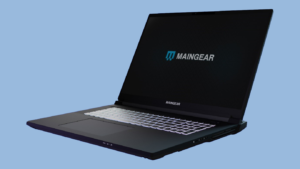
Framework Laptop image used with attribution to Framework
Introduction: The Modular Revolution
The Framework Laptop stands apart in today’s laptop market by embracing modularity, repairability, and sustainability. Born from the right-to-repair movement, Framework’s mission is clear: empower users with full control over their devices. Whether it’s upgrading a component, replacing damaged parts, or customizing ports—you can easily DIY it yourself.
Best Features
Modular & Repairable Design
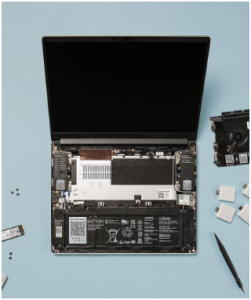
Every major component—mainboard, RAM, storage, keyboard, trackpad, battery, ports, and even the screen—is user-replaceable. Framework publishes guides and sells individual parts, upholding its open-source ethos pcworld.com+9frame.work+9reddit.com+9theverge.com+2en.wikipedia.org+2theverge.com+2.
Customizable Expansion Cards –
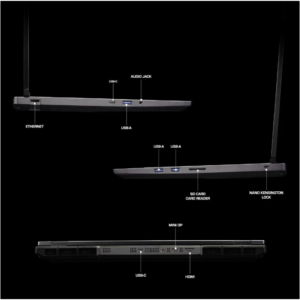
Rather than fixed ports, Framework includes configurable expansion-card slots. You choose what ports you need—USB-C (with Thunderbolt/USB4), USB-A, HDMI, DisplayPort, microSD, Ethernet, headphone jack—swapping them as desired.
DIY Edition – Choose a barebones chassis at a reduced price and install components yourself. Ideal for tinkerers or budget-conscious users looking to upgrade later frame.work+15frame.work+15reddit.com+15.
Future-Proof Upgrades – Need a more powerful CPU or upgraded GPU? Framework’s swappable mainboards make it possible—across generations, even cross-CPU-line (e.g., Intel to AMD) community.frame.work+13en.wikipedia.org+13theverge.com+13.
Sustainability Commitment – Framework’s ecosystem extends beyond hardware—it includes firmware openness (coreboot/UEFI) and community development. The company actively refurbishes and sells “factory seconds” to reduce waste .
Models & Specifications
Framework Laptop 13 (2025)
- CPU: Up to AMD Ryzen AI 9 HX 370 (12-core AI-centric)
- Memory: Up to 96 GB DDR5‑5600
- Display: 13.5″, 2880×1920, 120Hz matte panel
- Graphics: Integrated RDNA3 or discrete GPU via Expansion Bay
- Ports: 4 user-swappable expansion slots + combo audio jack
- Connectivity: Wi‑Fi 7, Bluetooth 5.4
- Webcam: 1080p with privacy LED and hardware kill-switch
- Battery: 61 Wh
- Weight: ~1.36 kg (3 lb) laptopmag.com+10pcworld.com+10fr.wikipedia.org+10en.wikipedia.org
Framework Laptop 12
- Type: 12.2″ convertible touchscreen 2-in-1
- CPU: 13th Gen Intel Core i3/i5
- Memory/Storage: Upgradeable via single SO-DIMM and M.2 slot
- Display: 1920×1200, stylus-compatible, 360° hinge
- Durability: Shock-absorbing TPU chassis, MIL‑STD‑810 rated pcworld.com+4theverge.com+4frame.work+4frame.work+1wired.com+1
Framework Laptop 16
- CPU: AMD Ryzen 7040HS (up to 8 cores)
- Graphics: RDNA3 Integrated or dGPU via expansion
- Display: 16″ 2560×1600
- Ports: Six swappable expansion card slots pcworld.com+3frame.work+3en.wikipedia.org+3
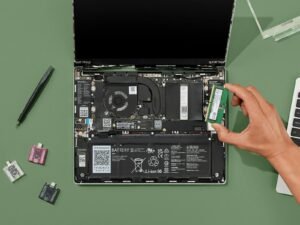

Framework Laptop image used with attribution to Framework
Performance Overview
Framework Laptop 13
With Ryzen AI 5/7/9 CPUs, this model delivers competitive performance in productivity and light creative workloads. The discrete GPU bay adds flexibility for heavier tasks wired.com+3theverge.com+3pcworld.com+3.
Reviewers noted strong multi-core performance but modest single-core results. Battery life ranged from 7.5 to 11 hours, lagging behind MacBook Air, but still adequate wired.com.
Framework Laptop 12
Optimized for light use—web, documents, education. Convertible functionality and screen repairability are its core strengths wired.com+4theverge.com+4wired.com+4.
Framework Laptop 16
Powered by Ryzen 7040HS, it offers desktop-like performance with great efficiency and integrated graphics. Modular GPU support further enhances its capabilities frame.work.

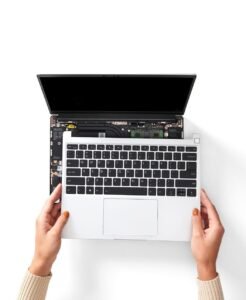
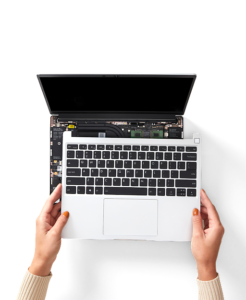
Framework Laptop image used with attribution to Framework
Pricing
Framework’s transparent pricing model offers configurations at two levels:
Framework Laptop 13
- DIY Edition: From US $899 (no RAM/SSD) reddit.com+11wired.com+11en.wikipedia.org+11
- Prebuilt: From US $1,099
Models:
- Ryzen AI 5 340: $989
- Ryzen AI 7 350: $1,349
- Ryzen AI 9 HX 370: $1,829 frame.work+3pcworld.com+3en.wikipedia.org+3
Framework Laptop 12
- Starts at US $799 for assembled units
- DIY Edition: From US $549 frame.work
Framework Laptop 16
Pricing aligns with premium Ryzen HS performance and modular GPU support—expect US $1,200+ depending on specs .
Pros & Cons
✅ Pros
- Truly modular and repairable—parts available and upgradeable
- Customizable port layout to suit your use
- DIY edition reduces entry cost and appeals to tinkerers
- Swappable mainboards enable CPU upgrades across generations
- Strong sustainability message, refurbishing, and open firmware
⚠️ Cons
- Premium pricing compared with sealed competitors
- Older peripherals (webcam, keyboard) can feel dated
- Battery life trails behind leading ultrabooks
- Performance modest in entry CPU options (e.g., i3, Ryzen 7040U)
Summary
The Framework Laptop is a bold step forward for user empowerment in computing. It bucks the sealed, disposable model by offering full component access, part-level support, and upgrade paths spanning beyond typical warranty periods. The expansion card architecture lets you truly personalize your machine.
Whether it’s the ultraportable Laptop 12, the balanced Laptop 13, or the powerful Laptop 16, Framework nails the ethos of sustainability and flexibility—though often at a cost premium and with some older hardware quirks.
Verdict: Should You Buy It?
Yes, if you:
- Value repairability and component-level upgrades
- Want a laptop that can evolve (CPU, RAM, ports, storage)
- Care about sustainability and reducing e-waste
- Enjoy customizing hardware and DIY builds
Maybe consider alternatives if you:
- Prioritize top-tier performance per dollar (e.g., MacBook Air, XPS 13)
- Need long battery life or premium media features
- Prefer a truly sealed, maintenance-free notebook
Final Recommendation
For tech enthusiasts, longevity-focused professionals, and those tired of throwaway electronics, the Framework Laptop is a groundbreaking choice. It’s not for everyone—its strength lies in modularity rather than maximum specs. If your top goals are flame graphics benchmarks or all-day battery life, other laptops may serve you better. But if you want a tool that lasts, you can fix, and you can future-proof—Framework stands almost alone.
🧾 TL;DR:
- What it is: Fully modular, repairable, customizable laptop (12″, 13″, 16″ sizes)
- Price: DIY from $549–899; prebuilt from $799–1,829
- Specs: Up to Ryzen AI 9 HX 370 (12-core), 96 GB RAM, 120Hz QHD+ display, swappable GPU
- Best for: Tech-savvy users, DIYers, sustainability advocates
- Not ideal for: Those needing max perf, long battery life, or sealed convenience
Check this out for the comparison to other laptops in your budget, or help configuring a Framework build?
Here’s a detailed comparison between the Framework Laptop and its competitors from Lenovo and Asus, focusing on similar premium thin-and-light or modular models. This helps determine which one is the best fit based on upgradeability, performance, value, and purpose.
Comparison Table
| Feature | Framework Laptop 13 | Lenovo ThinkPad X1 Carbon Gen 12 | Asus ZenBook 14 OLED (UX3405) |
| CPU | Up to AMD Ryzen AI 9 HX 370 or Intel Core Ultra 7 | Intel Core Ultra 7 155H | Intel Core Ultra 7 155H |
| RAM | Up to 96 GB (upgradeable SO-DIMM) | Up to 64 GB (soldered) | 32 GB LPDDR5X (soldered) |
| Storage | M.2 NVMe SSD (user upgradeable) | M.2 NVMe SSD (upgradeable) | M.2 NVMe SSD (upgradeable) |
| Display | 13.5″, 2880×1920, 120Hz | 14″, 2.8K OLED or WUXGA LCD | 14″, 2.8K OLED, 120Hz |
| GPU | Integrated RDNA3 or optional eGPU module | Integrated only (Intel Arc) | Integrated only (Intel Arc) |
| Ports | 4 swappable expansion cards | 2× Thunderbolt 4, USB-A, HDMI | 2× Thunderbolt 4, USB-A, HDMI |
| Battery | 61 Wh | 57–65 Wh | 75 Wh |
| Weight | ~1.36 kg | ~1.09 kg | ~1.20 kg |
| Repairability | Excellent (fully modular) | Moderate (some parts replaceable) | Limited (non-modular) |
| Price (USD) | $899–$1,829 | $1,600–$2,200 | $1,300–$1,700 |
Breakdown
🔧 Upgradeability & Repairability
- Framework Laptop dominates here. Everything from the mainboard to ports and even the screen is user-replaceable or upgradeable.
- ThinkPad X1 Carbon allows SSD replacement, but RAM is soldered. Battery, keyboard, and screen replacements are possible but harder.
- ZenBook 14 OLED has soldered RAM, sealed chassis, and limited serviceability.
Winner: 🥇 Framework Laptop
Performance
All three offer Intel Core Ultra CPUs (or AMD Ryzen AI in Framework). Performance is comparable in productivity tasks.
However:
- Framework offers up to 96 GB RAM and optional GPU expansion (on the 16″ model), making it better for devs, creators, or engineers.
- Lenovo and Asus use faster LPDDR5X RAM (though not upgradable), better for quick access but less flexible.
Winner: Tie — depends on your use case.
For raw flexibility and RAM ceiling: Framework.
For speed out-of-box: Asus/Lenovo.
Display Quality
- ZenBook 14 OLED and ThinkPad X1 Carbon OLED variant both have stunning 2.8K OLED panels with deep blacks and vibrant colors.
- Framework has a high-res 3:2 matte display (2880×1920) at 120 Hz—great for productivity, less eye-catching than OLED.
Winner: 🥇 Asus ZenBook 14 OLED (for media)
Framework wins for aspect ratio and matte workspace if you’re not after OLED glamor.
Battery Life
- ZenBook 14 OLED typically lasts 12–13 hours (larger battery, efficient screen).
- ThinkPad X1 Carbon also achieves 10–12 hours depending on config.
- Framework Laptop gets 7.5–9 hours in mixed use, which is decent but not best-in-class.
Winner: 🥇 Asus ZenBook
Build & Design
- ThinkPad X1 Carbon is incredibly thin and light, built with carbon fiber—legendary durability and portability.
- ZenBook feels premium with its metal unibody and sleek design.
- Framework is solid but slightly heavier due to modularity. Slightly chunkier chassis.
Winner: 🥇 ThinkPad X1 Carbon (for business)
ZenBook also strong contender for elegance.
Value for Money
- Framework Laptop DIY Edition starts at $899—you add your own RAM and storage.
- ZenBook offers a complete premium package for ~$1,300.
- ThinkPad X1 Carbon tends to be most expensive, but with great support and enterprise features.
Winner: Depends on needs
Want flexibility & future-proofing: Framework
All-in-one premium feel: ZenBook
Conclusion: Which One Should You Buy?
| Use Case | Best Choice |
| Modular, upgradeable, future-proof laptop | Framework Laptop |
| Lightweight business ultrabook with enterprise features | ThinkPad X1 Carbon |
| Media consumption, lightweight premium design | Asus ZenBook 14 OLED |
🟢 Final Thoughts
The Framework Laptop isn’t for everyone—but for tech-savvy users, developers, and sustainability-minded buyers, it’s unmatched. It’s not just a laptop—it’s a long-term computing platform.
- Buy Framework if you want to own your laptop—tinker, upgrade, and repair on your terms.
- Choose ThinkPad if you want a rock-solid business laptop with excellent support.
- Pick ZenBook if you want a beautiful OLED screen in a slim, fast package with no intention of opening the chassis.